🚀 Diploma in Microsoft Power Platform & AI‑Driven Business Automation 將於 2026年7月13日 開始 Early Bird 優惠 🎓 Diploma in AI Vibe, Agentic and AI Application Development 將於 2026年7月17日 開始 Limited Seats
🤖 AI Agent Development 新一代開發模式

從零開始學會
AI Agent 協助開發 Flutter App

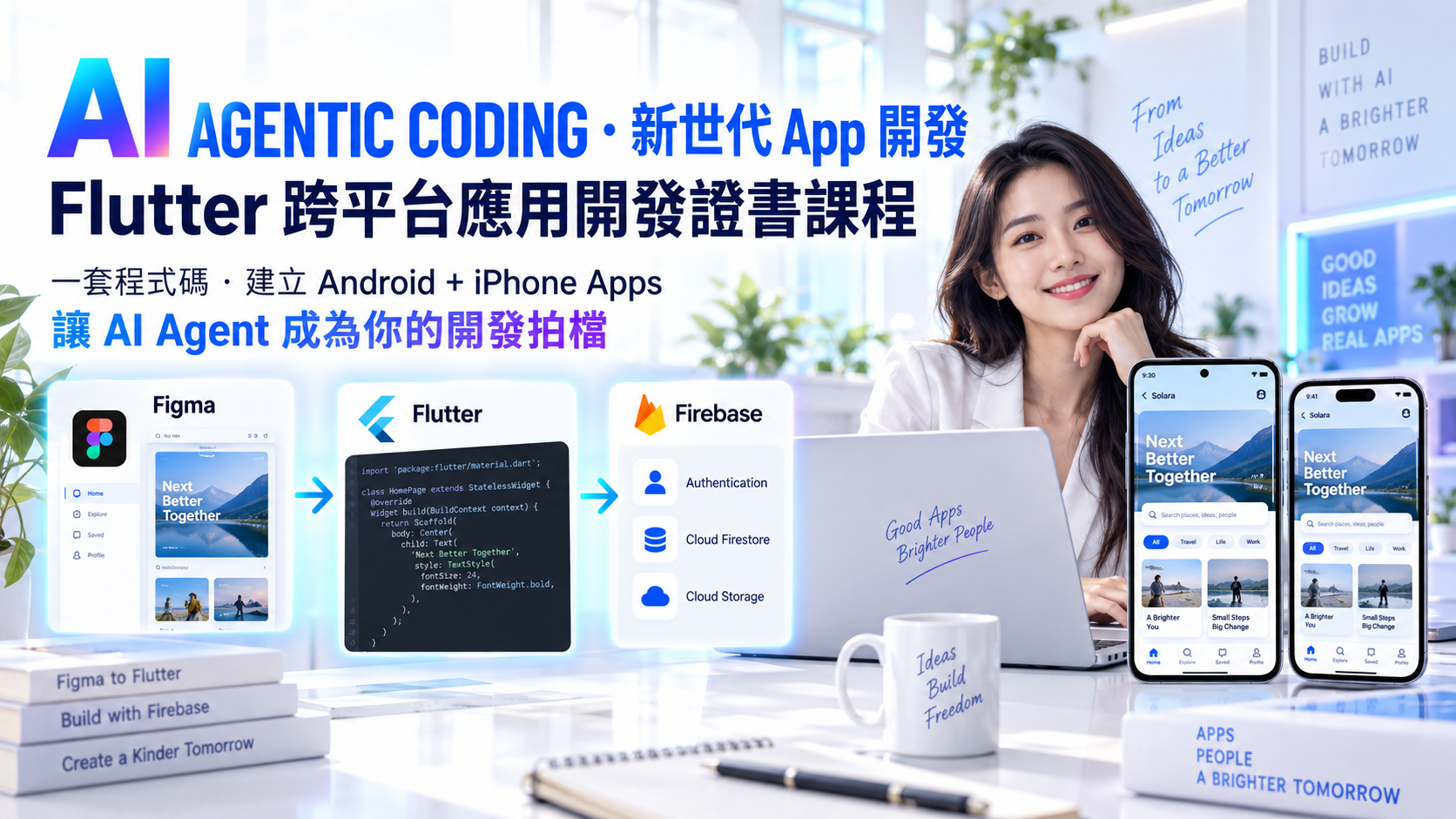
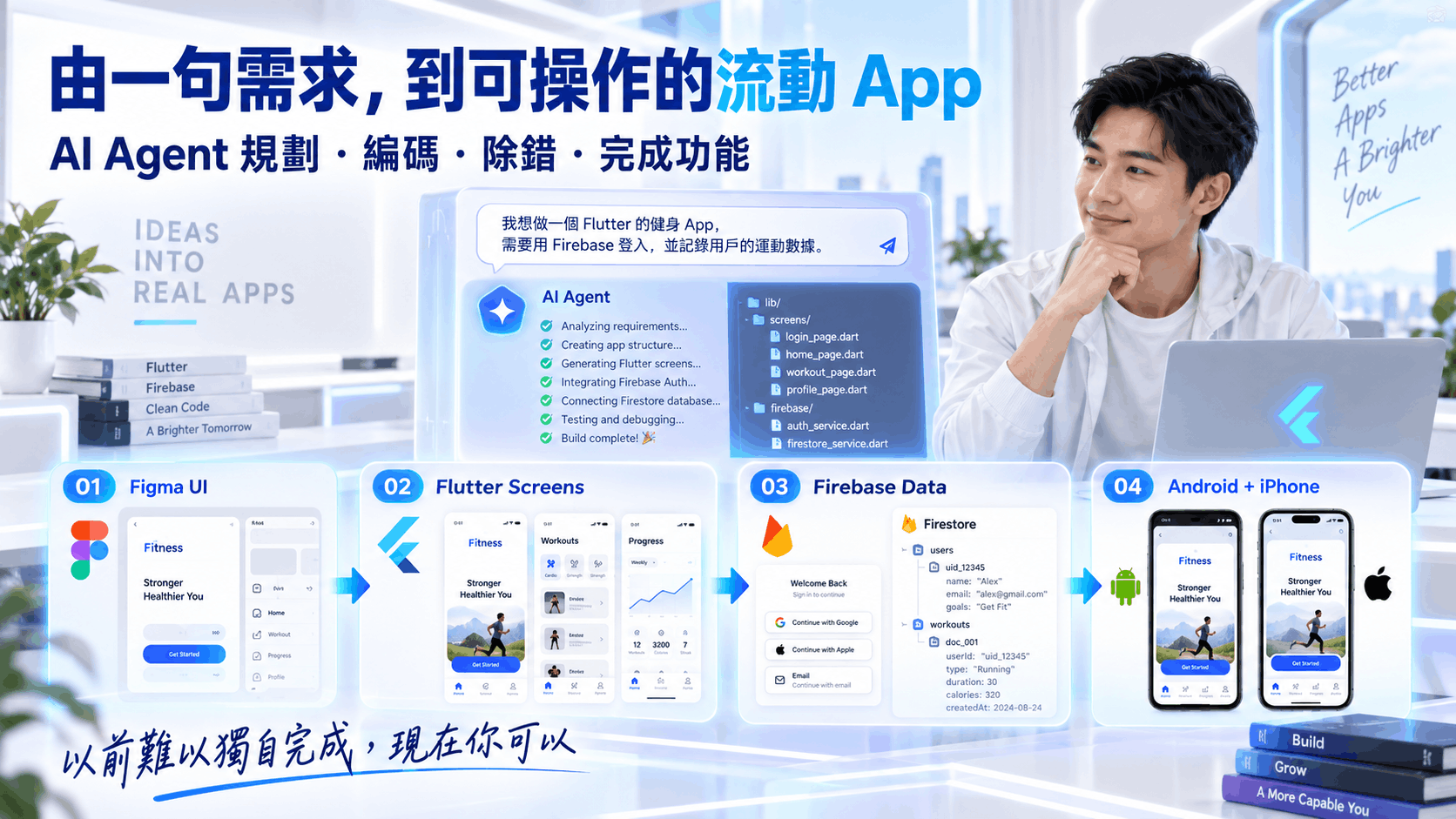
本課程專為沒有 AI Agent 或 Flutter 開發背景的人士而設, 由基礎 Dart、Flutter Widget、StatefulWidget、表單、ListView、Navigation 開始, 再學習如何使用 Cursor、OpenCode 及 AI Agent 協助開發, 並結合 Figma、Firebase Authentication、Cloud Firestore、Firebase Hosting, 最後把應用部署到 Web 及安裝到 Android 實體裝置。

🎯 您將學會:

  • ✅ 由零開始掌握 Dart 與 Flutter App 開發基礎
  • ✅ 使用 Cursor 及 OpenCode 以自然語言協助編寫、修改及除錯程式
  • ✅ 使用 Cursor Agent 與 OpenCode Plan / Build Mode 規劃及執行開發任務
  • ✅ 使用 Figma 設計稿配合 AI Agent 生成 Flutter 介面
  • ✅ 使用 Firebase Authentication 建立登入及登出功能
  • ✅ 使用 Cloud Firestore 建立即時資料 CRUD 功能
  • ✅ 使用 Firebase Hosting 部署 Flutter Web App
  • ✅ 建立 Release APK 並安裝到 Android 實體裝置測試

Certificate in AI Agentic Coding for Flutter Apps Development
AI 代理編碼 — Flutter 跨平台應用開發證書

本課程旨在幫助學員由零開始掌握 Flutter 跨平台應用開發,並學習如何運用 Cursor、OpenCode 及 AI Agent 提升開發效率。課程由 Dart、Flutter Widget、介面設計、互動狀態、表單、ListView、頁面導覽、本地狀態管理及 HTTP API 連接等基礎內容開始,逐步帶領學員建立可互動、可維護及可部署的 Flutter 應用。同時,課程亦會介紹如何把 Figma 設計稿 配合 Figma MCP、設計連結及 AI Prompt 轉化成 Flutter 介面,掌握由設計到程式實作的基本流程。

課程重點將放在 Agentic Coding 實戰工作流程,包括使用 Cursor Agent Mode 及 OpenCode Plan / Build Mode,讓 AI Agent 協助閱讀專案、拆解任務、修改多個檔案、撰寫功能、除錯、重構程式及建立長期專案上下文。學員亦會學習整合 Firebase Authentication、Cloud Firestore 及 Firebase Hosting,實作登入、登出、即時資料讀取、產品 CRUD 及 Web 部署功能。最後,課程會簡介 Android 開發環境、Release APK 建立及實體裝置安裝流程,協助學員完成一個具備登入、資料管理、Web 部署及 Android 實機測試能力的 Flutter 應用原型.
Certificate in AI Agentic Coding for Flutter Apps Development

課程特色 ✨

  • 由 Flutter 基礎開始: 課程由 Dart、MaterialApp、Scaffold、Text、Image、Button、Container、Row、Column 等基本概念開始,適合初學者入門。
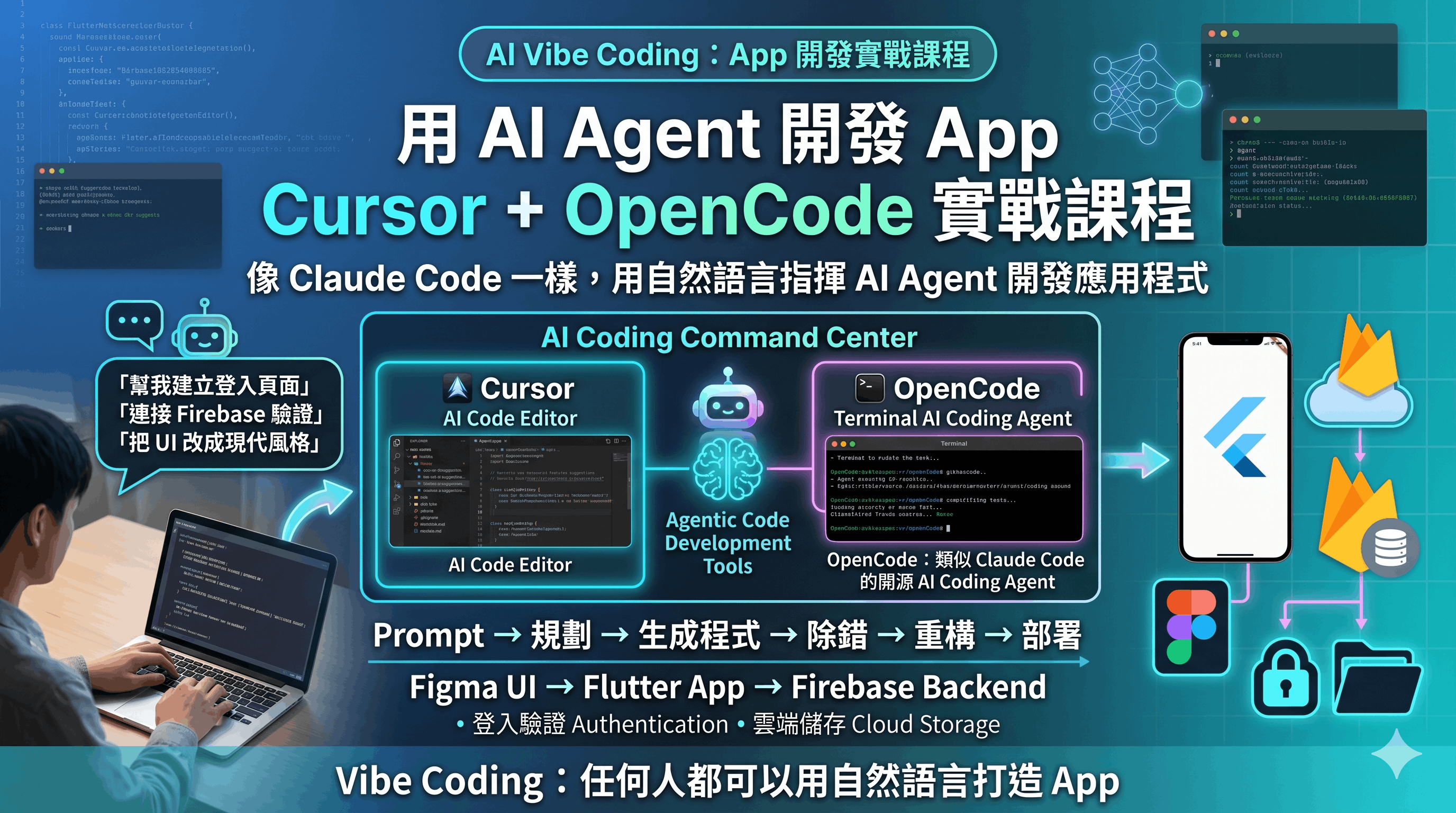
  • 以 Cursor 及 OpenCode 實踐 Agentic Coding: 學員將學習如何使用自然語言要求 AI Agent 修改程式、生成介面、重構程式、除錯及規劃開發任務。
  • 深入 Cursor Agent Mode: 學習如何讓 Cursor Agent 閱讀專案、理解需求、修改多個檔案、建立功能、修正錯誤及產生更可維護的 Flutter 程式碼。
  • 深入 OpenCode Plan / Build 工作流程: 學習如何使用 OpenCode 進行任務拆解、專案分析、生成 AGENTS.md、切換模型、壓縮上下文、回滾修改及逐步完成 App 功能。
  • 完整理解 StatelessWidget 與 StatefulWidget: 透過顯示/隱藏圖片、輸入資料、Radio、Checkbox、動態 ListView 等例子,掌握 Flutter 狀態管理基礎。
  • 涵蓋常用 Flutter App 元件: 包括 TextField、TextEditingController、ListView、ListView.builder、Navigator、Named Routes、SnackBar、Drawer、BottomNavigationBar、PopupMenuButton、DropdownButton、Dialog、DatePicker 及 TimePicker。
  • 掌握 Flutter Layout 設計: 深入學習 Container、Row、Column、mainAxisAlignment、crossAxisAlignment、Scaffold 及自訂畫面結構。
  • 學習本地狀態與共享狀態管理: 由 setState 開始,逐步理解 lifting state up、callback 傳值、Provider 及 ChangeNotifier 的基本應用。
  • 連接外部 API: 學習使用 HTTP package、Future、async / await、jsonDecode、Model class、FutureBuilder,以及圖片下載與資料 POST。
  • Figma 到 Flutter 工作流程: 學習如何使用 Figma MCP、Cursor 及 OpenCode,把 Figma 設計稿轉換成 Flutter 介面。
  • Firebase 完整整合: 包括 Firebase 專案建立、Authentication、Cloud Firestore、即時資料 StreamBuilder、CRUD、Firebase Hosting 及部署。
  • 輕量化 Android 實機部署: 簡介 JDK、Android SDK、Flutter Doctor、APK build 及 Android 實體裝置安裝,不會過度集中於繁複環境設定。
  • 專案導向實作: 課程最終會建立一個具備登入、產品資料管理、Firestore 即時同步、Web Hosting 及 Android 安裝能力的 Flutter App。

課程收穫 🎓

  • 掌握 Flutter App 開發基礎: 能理解 Dart、Widget Tree、MaterialApp、Scaffold、StatelessWidget、StatefulWidget、build method 及 BuildContext 的核心概念。
  • 能建立互動式 Flutter 介面: 能使用 Text、Image、Button、TextField、Radio、Checkbox、ListView、Dialog、Dropdown、Drawer、Bottom Tab 等常見元件建立應用畫面。
  • 掌握 State Management 基礎: 能使用 setState 管理本地狀態,理解 lifting state up、callback 傳值,以及 Provider 的基本使用場景。
  • 掌握 Cursor 與 OpenCode 輔助開發能力: 能使用 AI Agent 協助編寫、修改、分析、除錯及重構 Flutter 程式碼,並建立更有效率的 Agentic Coding 工作流程。
  • 掌握 Agentic Development 工作流程: 能使用 Cursor Agent Mode 與 OpenCode Plan / Build Mode 進行需求拆解、任務規劃、跨檔案修改、錯誤修復、專案規則建立及功能迭代。
  • 具備 Figma 到 Flutter 的設計落地能力: 能使用 Figma MCP 或 Figma 設計連結,配合 Cursor / OpenCode 生成 Flutter 頁面,理解設計與程式開發的銜接方式。
  • 掌握 HTTP 與 JSON 資料處理: 能使用 http package 發送 GET / POST request,理解 Future、async / await、jsonDecode、Model class 及 FutureBuilder。
  • 掌握 Firebase Authentication: 能建立 Email / Password 登入、登出及登入狀態監聽功能。
  • 掌握 Cloud Firestore CRUD: 能使用 Firestore collection、document、get、snapshots、add、update、delete 實作即時資料管理功能。
  • 掌握 Flutter Web 部署: 能把 Flutter Web App build 成靜態網站,並部署到 Firebase Hosting。
  • 掌握 Android 實機安裝流程: 能完成基本 Android 開發環境檢查,建立 release APK,並安裝到 Android 實體手機測試。
  • 完成可展示的應用作品: 建立一個由 AI Agent 協助開發、具備登入、資料管理、Web 部署及 Android 實機測試能力的 Flutter App。

完成課程後,您將具備:

  • AI 輔助 Flutter 開發能力: 能在實際開發中使用 Cursor、OpenCode 及 AI Agent 加速程式撰寫、修改及除錯。
  • Flutter 跨平台應用開發能力: 能以單一程式碼庫建立 Android、iOS 及 Web 應用的基礎架構。
  • AI Agent 任務管理能力: 能把大型開發需求拆成可執行任務,並指導 AI Agent 逐步完成 UI、狀態、資料、Firebase 及部署相關工作。
  • Figma 設計轉換能力: 能把 Figma 設計稿配合 AI 工具轉化為 Flutter UI。
  • Firebase 後端整合能力: 能完成登入、登出、即時資料讀取及 Firestore CRUD 功能。
  • 部署及測試能力: 能把 Flutter App 部署到 Firebase Hosting,並建立 APK 安裝到 Android 實體裝置。
  • Agentic Development 工作流程思維: 理解如何把 AI Agent 融入需求分析、程式生成、測試、重構、部署及文件整理流程。

課程目標對象 👩‍💻👨‍💻

  • 🔰 Flutter 初學者: 希望由零開始學習 Dart、Flutter Widget、App 介面設計及跨平台開發的人士。
  • 🤖 對 AI Agent 開發有興趣的人士: 希望學習如何使用 Cursor、OpenCode 及 AI Agent 協助程式開發、除錯及重構的人士。
  • 📱 想建立跨平台 App 的人士: 希望使用 Flutter 同時建立 Android、iOS 及 Web App 的學員。
  • 🎨 UI/UX 設計師或產品設計人員: 希望理解如何把 Figma 設計稿轉化成 Flutter 介面,並配合 AI 工具提升開發效率的人士。
  • ☁️ 想學習 Firebase 後端整合的人士: 希望掌握 Authentication、Firestore、Hosting 及即時資料同步功能的人士。
  • 🚀 創業者、產品經理及獨立開發者: 希望快速建立 MVP,並利用 AI Agent 加快產品開發及驗證流程的人士。
  • 💼 現職開發者: 希望把 AI-assisted development、Agentic Coding 及 Firebase 快速開發流程引入日常工作的人士。

為什麼選擇這課程? 🤔

  • 🚀 真正由零到部署: 課程不只介紹 Flutter 語法,而是由基本 Widget、互動狀態、API、Firebase,到 Web Hosting 及 Android 實機安裝完整覆蓋。
  • 🤖 結合 Cursor 與 OpenCode: 學員將實際使用兩款 AI coding assistant,學習如何以自然語言修改程式、建立頁面、除錯、重構及規劃開發任務。
  • 🧠 更重視 Agentic Coding 能力: 課程會示範如何讓 AI Agent 理解專案上下文、規劃任務、處理多檔案修改、建立規則文件及持續迭代功能。
  • 🎨 結合 Figma 設計流程: 課程會示範如何從 Figma 設計稿產生 Flutter App,讓學員理解設計與開發之間的實務銜接。
  • ☁️ Firebase 實戰導向: 包括 Authentication、Firestore、StreamBuilder 即時更新、CRUD、Hosting 及 Firebase Console 操作。
  • 📱 包含 Android 實體裝置部署: 課程會簡明示範如何建立 APK 並安裝到 Android 手機,但不會過度集中於 Java 或複雜部署細節。
  • 🧩 適合初學者: 由簡單 Text、Image、Button、ListView 開始,逐步進入 Firebase 及 AI Agent 開發流程。
  • 🎥 可配合錄影重溫: 學員可在課後重複觀看課程影片,加深對 Flutter、Firebase 及 AI coding 工具的理解。

你將學到什麼 💡

了解 Dart、Flutter、MaterialApp、Scaffold 及 Widget Tree 的基本概念。

使用 Text、Image、Button、Container、Row、Column 建立 Flutter 基礎介面。

掌握 StatelessWidget、StatefulWidget、setState 及 Flutter 畫面更新機制。

使用 TextField、TextEditingController、Radio、Checkbox 建立互動表單。

使用 ListView、ListView.builder 及動態清單建立可新增及刪除資料的 App。

掌握 Navigator、Named Routes、資料傳遞及頁面返回結果。

使用 SnackBar、Drawer、BottomNavigationBar、PopupMenuButton、DropdownButton、Dialog、DatePicker 及 TimePicker。

理解 Future、async / await、HTTP request、JSON、Model class 及 FutureBuilder。

使用 Cursor Agent Mode 讓 AI 閱讀專案、修改多個檔案、建立功能及修復錯誤。

使用 OpenCode Plan / Build Mode 進行任務拆解、程式生成、重構及專案規則管理。

建立 AGENTS.md 及 .cursor/rules,讓 AI Agent 長期理解專案背景及開發規範。

使用 Figma MCP 及設計連結,把 Figma 頁面轉換成 Flutter App 介面。

建立 Firebase Authentication 登入、登出及登入狀態監聽功能。

使用 Cloud Firestore 建立即時產品資料 CRUD 功能。

使用 Firebase Hosting 部署 Flutter Web App,並建立 APK 安裝到 Android 實體裝置。

Course Content

Objective: Build a solid foundation in Dart and Flutter app development, understand how Flutter displays user interfaces using widgets, and use Cursor to explain and modify simple Flutter code with natural language prompts.

  1. Introduction to Flutter Development
    • What Flutter is and why it is suitable for Android, iOS and Web development
    • Understanding Flutter project structure at a beginner level
    • Understanding MaterialApp, Scaffold, AppBar and body
    • How runApp() displays the Flutter application
    • Building a simple “Hello, World!” Flutter App
  2. Dart Basics for Flutter Beginners
    • Understanding variables, strings, numbers and booleans
    • Using List and Map for simple app data
    • Understanding functions, parameters and return values
    • Understanding classes and objects in simple Flutter examples
    • Reading basic Dart code generated by AI tools
  3. StatelessWidget and Widget Structure
    • Why widget classes are preferred over building everything inside main()
    • Understanding StatelessWidget, build method and BuildContext
    • Moving app UI into a MyApp class
    • Understanding widget tree and nested widgets
    • Understanding why Flutter rebuilds widgets
  4. Text, TextStyle and Basic UI Widgets
    • Using Text widgets and common Text properties
    • Applying TextStyle: fontSize, fontWeight, color, decoration and spacing
    • Displaying multiple widgets using Column
    • Using SizedBox for spacing
    • Using Icon and basic visual elements
  5. Images and Assets
    • Adding image files to the Flutter project
    • Registering assets in pubspec.yaml
    • Running flutter pub get
    • Displaying images with Image.asset
    • Understanding Image.network, Image.file and Image.memory at a basic level
  6. Buttons and Basic Interaction
    • Using ElevatedButton, TextButton, OutlinedButton, IconButton and FloatingActionButton
    • Understanding onPressed and child
    • Understanding disabled buttons with onPressed: null
    • Using simple print statements and text changes for interaction
  7. Layouts with Container, Row and Column
    • Using Container as a styled box
    • Understanding width, height, padding, margin, decoration and alignment
    • Using Row for horizontal layout and Column for vertical layout
    • Understanding mainAxisAlignment and crossAxisAlignment
    • Creating simple card-style layouts
  8. First Cursor AI-Assisted Flutter Workflow
    • Using Cursor to explain existing Flutter code
    • Highlighting code and using natural language requests with Ctrl + K
    • Asking Cursor to change colors, text, spacing and layout
    • Using Cursor Chat to ask beginner Flutter questions
    • Learning how to review AI-generated code instead of blindly accepting it

Objective: Build interactive Flutter apps using StatefulWidget, forms, dynamic lists and navigation, then use Cursor Agent Mode to modify multiple files, generate app screens and improve UI behaviour through an agentic workflow.

  1. StatefulWidget and setState
    • Understanding why apps need changing state
    • Difference between StatelessWidget and StatefulWidget
    • Understanding the two-class structure: StatefulWidget and State
    • Using setState to update variables and redraw the screen
    • Building show / hide image examples
  2. Text Input and TextEditingController
    • Using TextField to accept user input
    • Reading user input with TextEditingController
    • Saving and clearing input data
    • Understanding controller.text and controller.clear()
    • Using dispose() to clean up controllers
  3. Radio Buttons, Checkboxes and Form Interaction
    • Using Radio widgets for single choice selection
    • Understanding value and groupValue
    • Using CheckboxListTile for multiple selections
    • Building a hobby selector with a list of checkbox items
    • Limiting selected choices using setState logic
  4. ListView and Dynamic Lists
    • Displaying fixed lists using ListView
    • Using ListTile with leading, title, subtitle and trailing
    • Using ListView.builder for efficient long lists
    • Adding items dynamically from user input
    • Deleting items using IconButton and index
  5. Navigation Between Pages
    • Understanding Navigator as a stack of pages
    • Using Navigator.push and Navigator.pop
    • Using MaterialPageRoute
    • Passing data to another page
    • Returning data back from another page
    • Using named routes with MaterialApp routes
  6. Common App UI Components
    • Using BottomNavigationBar for bottom tabs
    • Using Drawer for side navigation
    • Using PopupMenuButton for command menus
    • Using DropdownButton for selected values
    • Using showDialog and AlertDialog
    • Using showDatePicker and showTimePicker
  7. Widget Lifecycle and Basic State Thinking
    • Understanding StatefulWidget lifecycle
    • Using initState for one-time setup
    • Using build for UI rendering
    • Using dispose for cleanup
    • Understanding why build should stay pure and fast
  8. Cursor Agent Mode for Multi-File Flutter Development
    • Understanding the difference between inline editing, chat and Agent Mode
    • Asking Cursor Agent to read the project structure before changing code
    • Using Agent Mode to create new pages and connect navigation
    • Asking Cursor Agent to refactor repeated UI into reusable widgets
    • Using Cursor Agent to fix compile errors and explain the root cause
    • Reviewing proposed changes before accepting them
    • Writing better prompts for UI, logic, state and navigation changes

Objective: Connect Flutter apps to external APIs and Firebase services, transform Figma designs into Flutter screens, and use OpenCode to plan, generate, review and refine app features using an agentic development workflow.

  1. Local and Shared State Management
    • Using setState for local state
    • Understanding lifting state up
    • Passing data down through constructors
    • Sending events upward using callbacks
    • Using ValueChanged and VoidCallback
    • Introduction to Provider, ChangeNotifier, context.watch and context.read
  2. HTTP Requests, JSON and FutureBuilder
    • Installing the http package
    • Adding Android internet permission at a basic level
    • Understanding Future, async and await
    • Downloading text and JSON data from an API
    • Using jsonDecode to parse JSON
    • Building a model class with fromJson
    • Downloading and displaying images using bodyBytes and Image.memory
    • Posting data to a server with jsonEncode
    • Using FutureBuilder to handle loading, error and data states
  3. Figma to Flutter with Cursor and OpenCode
    • Creating a Figma account and project
    • Installing Figma MCP for Flutter in Cursor
    • Connecting and authenticating Figma MCP server
    • Copying Figma frame links and generating Flutter pages
    • Using Cursor and OpenCode to build Figma-based apps
    • Understanding when to use MCP and when to use text prompts
    • Refining generated UI using Flutter layout knowledge
  4. Firebase Platform Overview and Project Setup
    • What Firebase is and why it is useful for app development
    • Understanding Firebase Authentication, Firestore, Hosting, Storage and Cloud Functions
    • Firebase compared with traditional backend development
    • Registering a free Firebase account
    • Creating a new Firebase project
    • Understanding Spark and Blaze plans at a basic level
    • Enabling Authentication and Firestore database
  5. Connect Flutter to Firebase
    • Creating or preparing a Flutter project for Firebase
    • Installing firebase-tools and FlutterFire CLI
    • Running flutterfire configure
    • Adding firebase_core, firebase_auth, cloud_firestore and google_sign_in packages
    • Understanding firebase_options.dart
    • Initializing Firebase in main.dart
  6. Firebase Authentication in Flutter
    • Adding dummy user accounts in Firebase Console
    • Building a login page with email and password fields
    • Using signInWithEmailAndPassword
    • Handling FirebaseAuthException and displaying error messages
    • Using authStateChanges as an AuthGate
    • Showing ProductPage only after login
    • Implementing logout with FirebaseAuth.instance.signOut()
  7. Firestore Collections, Documents and CRUD
    • Understanding collections and documents
    • Creating a products collection
    • Understanding product fields such as pid, productName, price and qty
    • Reading products collection with get()
    • Using FutureBuilder with QuerySnapshot
    • Using snapshots() with StreamBuilder for real-time updates
    • Adding new product documents with add()
    • Editing product data using dialog forms
    • Updating documents with doc(id).update()
    • Deleting documents with doc(id).delete()
  8. OpenCode Agentic Workflow for Flutter and Firebase
    • Installing and launching OpenCode TUI
    • Using OpenCode Zen as LLM provider
    • Entering API key and choosing a suitable model
    • Understanding Build mode and Plan mode
    • Using slash commands such as /init, /models, /undo and /compact
    • Generating AGENTS.md as persistent project context
    • Using OpenCode to inspect the Flutter project before editing
    • Asking OpenCode to plan Firebase Auth and Firestore CRUD tasks
    • Using OpenCode to scaffold pages, services and reusable widgets
    • Comparing OpenCode output with Cursor Agent output

Objective: Strengthen the complete Flutter app using Cursor Agent and OpenCode, improve project structure, refactor code, test core user flows, prepare project documentation, and briefly cover Firebase Hosting and Android APK generation for final demonstration.

  1. Review the Complete Flutter App Architecture
    • Reviewing the app built from previous lessons
    • Understanding the relationship between screens, widgets, services and Firebase
    • Identifying repeated code, messy UI logic and areas for refactoring
    • Understanding what makes Flutter code easier for AI Agents to maintain
    • Preparing the project for agentic improvement tasks
  2. Advanced Cursor Agent Mode for Feature Iteration
    • Using Cursor Agent to analyse the whole project before coding
    • Asking Cursor Agent to create a step-by-step implementation plan
    • Using Agent Mode to add a new feature across multiple files
    • Adding validation, loading states and error messages to existing pages
    • Improving login, product list and product edit user experience
    • Using Cursor Agent to explain every changed file after implementation
    • Learning how to reject, adjust or re-prompt when AI changes are not suitable
  3. Advanced OpenCode Plan / Build Workflow
    • Using OpenCode Plan Mode to break down a larger app improvement request
    • Using OpenCode Build Mode to implement one task at a time
    • Using /compact to manage long project context
    • Using /undo to safely revert unwanted changes
    • Switching models for planning, coding, explanation and debugging tasks
    • Asking OpenCode to compare possible solutions before coding
    • Using OpenCode as a pair programmer for Flutter and Firebase troubleshooting
  4. Creating Long-Term AI Project Context
    • Writing AGENTS.md to describe project goals, folder structure and coding rules
    • Creating or updating .cursor/rules for Flutter coding conventions
    • Documenting preferred state management, naming style and file structure
    • Adding instructions for Firebase Auth and Firestore usage
    • Adding instructions for UI consistency and error handling
    • Testing whether Cursor and OpenCode follow the project rules in later edits
  5. Refactoring Flutter Code with AI Agent Assistance
    • Moving repeated UI sections into reusable widgets
    • Separating Firebase access logic from screen UI code
    • Creating simple service classes for Auth and Product data
    • Improving variable names and function names
    • Reducing overly long build methods
    • Using AI to suggest safer parsing for price and quantity fields
    • Reviewing refactored code manually to avoid hidden mistakes
  6. Debugging, Testing and Quality Review with Cursor and OpenCode
    • Using Flutter error messages as prompts for AI debugging
    • Asking Cursor Agent to locate the likely source of an error
    • Asking OpenCode to propose a debugging checklist
    • Testing login, logout, product add, product edit and product delete flows
    • Checking loading, empty data and error states
    • Using AI to generate manual test cases for the final app
    • Understanding the limits of AI-generated fixes and the need for human review
  7. Firebase Hosting and Web Deployment Overview
    • Understanding Flutter Web deployment at a high level
    • Running flutter build web
    • Understanding the build/web output folder
    • Using firebase init hosting with build/web as the public directory
    • Configuring as a single-page app
    • Deploying with firebase deploy
    • Using Cursor or OpenCode to check deployment configuration and explain common errors
  8. Android APK Generation and Physical Device Preview
    • Briefly understanding the role of JDK, Android SDK and Flutter Doctor
    • Using flutter doctor to identify missing Android build requirements
    • Using AI Agent to explain Flutter Doctor warnings in simple language
    • Running flutter build apk --release
    • Finding build/app/outputs/flutter-apk/app-release.apk
    • Installing APK manually on Android physical device for testing
    • Understanding that this section focuses on practical preview, not deep Java or Android platform configuration
  9. Final Project Review and Presentation
    • Reviewing the complete Flutter + Firebase app
    • Explaining how Cursor and OpenCode supported the development process
    • Presenting login, Firestore CRUD, Web deployment and Android installation
    • Showing examples of AGENTS.md and .cursor/rules used in the project
    • Discussing how to continue improving the app with AI Agent support
    • Discussing future learning paths: Provider, Riverpod, advanced Firebase, Play Store publishing and production security rules

導師簡介

Dannis Mok

He has rich experience in business web and apps system development and over 25 years of teaching experience. He has a great passion for learning and teaching new technologies, and his teaching style is clear, to the point, and simplifies complex technologies into easy-to-understand terms.

He has delivered various workshops and classes for well-known corporates, government departments, and local universities, specializing in office automation, data science, data analysis, and business web and apps system development. He is the principal lecturer for NCC Education and University of Greenwich, and has provided training that equips professionals with practical skills tailored to industry needs.

By leveraging his expertise in these areas, he has successfully trained professionals in corporate organizations and government departments to enhance efficiency, adopt data-driven decision-making, and embrace automation technologies.

In addition to his BSc degree in IT, he holds an MBA, an MSc in IT, and an MSc in Telecommunication.

Microsoft MOS Master Microsoft MOS Word Microsoft MOS Excel Microsoft MOS PowerPoint Microsoft MOS Access CompTIA Data Plus Microsoft Power BI Data Analyst Associate Python Institute PCAP
相關專業認證
  • Microsoft MCSE, MCDBA
  • Microsoft Certified System Developer
  • Microsoft Office Specialist Master
  • Cisco CCNA,CCDA,CCNP,CCDP
  • Sun Microsystems -- Certified Java Programmer
  • Oracle -- Certified Database Professional
  • Linux - LPI Level 1 & 2
  • CompTIA Data+
  • Microsoft Certified: Power BI Data Analyst Associate
  • Python Institute: Certified Associate Python Programmer
相關教學經驗
  • 為積金局 (MPF) IT 員工提供 Android 及 iPhone 視像培訓課程
  • 為香港教育局提供 Android 培訓課程予中學電腦科導師
  • 為香港教育大學 IT 員工提供 Cordova 跨平台流動程式開發課程
  • 為房屋署員工 IT 員工提供 HTML5 跨平台流動程式開發課程
  • 為房屋署員工 IT 員工提供 Android 及 iPhone 平台流動程式開發課程
  • 為香格里拉大酒店IT 員工提供 Android 流動程式開發課程
  • 為勞工處提供 HTML5 遊戲培訓課程及電子商店培訓課程
  • 為中國銀行IT 員工提供 Android 及 iPhone 流動程式開發課程
  • 為香港郵政IT 員工提供 Angular 8 程式開發課程
  • 為 VTC 職業訓練局提供各種各類 IT 培訓課程
  • 為醫管局員工 IT 員工提供跨平台流動程式開發課程

視像課程內容

除面授課堂外,同學亦可重溫課程錄影片段, 觀看期為一年,可在家無限重播。


網上學習系統

為配合在職人士及初學者的學習需要,本校的課程已全部錄影。 學員可因應自己的學習進度,隨時隨地重溫 Flutter 基礎開發、 Cursor 與 OpenCode Agentic Coding、Figma to Flutter、 Firebase Authentication、Cloud Firestore、Firebase Hosting、 Android APK 建立及實體手機安裝流程。

詳細視像課程內容,請登入網上學習系統觀看。

登入戶口: demo

登入密碼: demo

LOGIN
Online Learning System

報名及付款

Certificate in AI Agentic Coding for Flutter Apps Development

本課程由 Flutter 基礎開始,透過 Cursor、OpenCode 及 AI Agent 協助學員建立跨平台應用。 課程涵蓋 Dart、Flutter Widget、StatefulWidget、表單、ListView、Navigation、HTTP API、 Figma to Flutter、Firebase Authentication、Cloud Firestore、Firebase Hosting, 以及 Android APK 建立與實體手機安裝。

Course Code: AAD2026

Schedule: Starts on 11st Sept 2026 (Friday), 7:00 PM -- 9:30 PM

Total Duration: 4 lessons

🎉 Early Bird Discount 🎉

$3,280 $2,280

🔥 學員專屬優惠 — 限時加購

📱 想全面掌握流動應用程式開發?AI + 傳統開發雙軌並行!
加購《Certificate in AI-Powered Mobile App Development》30 小時影片課程,助您技術全面升級!

本課程(Agentic Coding for Flutter Apps Development)著重以 Cursor、OpenCode 及 AI Agent 協助 Flutter 跨平台應用開發。 而《AI-Powered Mobile App Development》則提供 20 小時基礎影片 + 10 小時 AI 實戰影片, 涵蓋 Android 原生開發(Kotlin)、React Native 跨平台開發及 Firebase 整合, 再配合多款 AI 工具應用(Copilot、ChatGPT、Claude、Gemini), 讓您既懂 AI 生成、又懂手動開發與除錯,兩門課程互補互益,學習效果倍增。

  • 深入學習 Android 原生(Kotlin)及 React Native 跨平台開發基礎
  • 30 小時影片課程,一年觀看期,隨時隨地無限重溫
  • 同時掌握傳統開發 + AI 輔助開發,能力更全面
  • 兩門課程搭配學習,從入門到實戰一步到位
原價 $1,980 學員優惠價 $1,000 慳 $980
查看完整課程詳情 →

其他付款方式

支付詳情

  • 轉數快: 快速支付系統識別碼: 108329293
  • 銀行轉帳: 恆生銀行 #789-681384-883
    (戶口名稱: UNiSOFT Education Limited)
  • 支票付款: 枱頭請寫 UNiSOFT Education Limited

注意: 如選用轉數快或銀行轉帳完成付款後,請將付款記錄 Whatsapp 到 90455522

校舍地址及聯繫方式

校舍地址: 九龍佐敦德興街12號興富中心5樓501室
辦公時間: 星期一至星期五 上午11時至晚上8時